
| •Since 1998•Main Site•Farmall Tractors•Camp Livingston•Camp Claiborne•Doctor Blue Box•Louisiana Drones• La GMRS•UTV Mules•Landlords• |

|
Using MoCA & DirecTV DECA for Home and Building-to-Building NetworkingMoCA (Multimedia over Coax Alliance) is a technology that allows Ethernet to be transmitted over standard coax cable. It is one of the most reliable ways to move internet around a home, especially when running new Ethernet cable is difficult or impossible. This page explains how to use both MoCA adapters and the much cheaper DirecTV DECA adapters to build a coax-based network inside a home or even between buildings. Why Use Coax for Networking?Underground CAT5/CAT6 cable is expensive, breaks down over time, and is easily damaged by lightning induction. RG6 coax, on the other hand:
For long runs, detached garages, shops, or older homes, coax is often the best option. MoCA vs DECAMoCA adapters typically operate between 800–1675 MHz. This requires:
DirecTV DECA (DirecTV Ethernet Coax Adapter) uses the MoCA standard but at a much lower frequency range of 400–700 MHz. This allows DECA to work on:
And DECA units cost only $5–$10 on the surplus market. Why DECA Is the Best Low-Cost OptionDECA is essentially “MoCA Lite” — same concept, lower frequency, cheaper hardware. It was designed to coexist with DirecTV satellite signals, so it works extremely well on any coax system. DECA is perfect for:
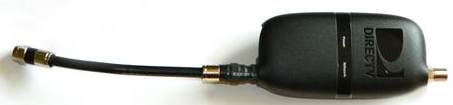
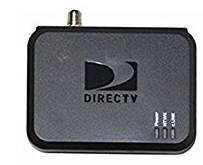
Types of DECA AdaptersBelow are the common DECA units you’ll find: 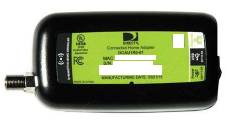
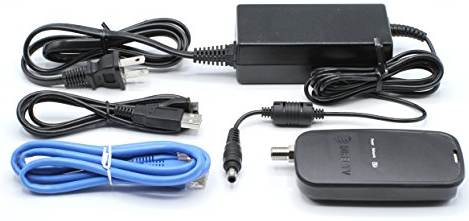
Important: Choose the Right DECAYou want the DECA units that have:
Avoid the DECA units that require voltage from a DirecTV receiver unless you also use DirecTV splitters designed to pass power.
USB-powered DECA units:Dont really recomend these. Never connect it to your computer ot tvs USB port and a surege in the coax could pass into the USB.
If your DECA is near your router, use the desktop version with the factory power supply. Operation
The non USB versions have 3 lights the CLINK one will flash orange until it gets a lock This to show good connection I suspect. The usb versions dont act the same way i dont knwo why. They are automatic they sync with each other and the one with internet becomes the master. So you can add a splitter and add lots of them wired out from the splitter. When ordering on Ebay look for the above one with a power supply. Splitters for DECADirecTV SWM splitters (green label) are ideal because they are designed to pass DECA frequencies between output ports. 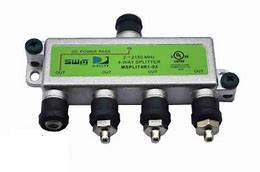
These splitters have:
Using Normal SplittersYou can use normal splitters, but:
Experimentation is sometimes needed to find the best configuration. PerformanceDECA typically delivers:
This is more than enough for:
Lightning & Power Surge ProtectionWhen I first started experimenting with DECA links between buildings, I blew up one of the original USB-powered units during a lightning event. The surge traveled through the coax, went straight into the DECA, and then continued out the USB port — destroying the USB jack on the computer. If you are running DECA or MoCA between buildings, you must treat the coax like any other outdoor line. That means:
After adding grounding blocks and surge protection, I have not had a single failure. DECA is extremely reliable as long as the coax is properly grounded and the USB-powered units are avoided for outdoor runs. 2026 NotesDECA adapters are widely available as surplus equipment, often brand new. They remain one of the cheapest and most reliable ways to build a coax-based network inside a home or between buildings. More photos and wiring diagrams will be added soon. |
Copyright 1998/2026 by winnfreenet.com all rights reserved.