This page is a archive I have since sold all my voom receivers. I still have some antenna modules and diplexors if you want one contact me.
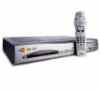
Voom receivers are the Motorola DSR550 receiver.
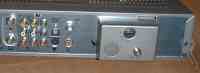
The receiver should have a OFF AIR HDTV module installed on
the back.
Receivers can not be used with any satellite service at this
time but hobbyist are working on them and a conversion to may be possible
later on. The receiver is compatible with HDTV DC2 and Mpeg2DVB signals with
a DVR upgrade capability. So hold on to your receivers.
Which receiver do you need to receive Off the Air.
3 types of receivers are in the field. You need the 1st or
2nd one. Along with its security card and OFF Air module. Security cards are
not matched to the box so any voom card will do.
A receiver from a customer that was active and receiving
service when voom when out of business. Or a receiver from a customer that
was disconnected from the dish before service was disconnected.
A receiver that was disconnected from the dish before
service was disconnected but before the new Install Wizard software was
downloaded into it. Such a receiver will only receive the OFF air Channels
preprogrammed into it. So it can not be moved outside its original install
area.
A receiver that was shut down because a customer
disconnected service. It will have a message onscreen that the receiver
[needs activation] and will not let you view the OFF air Channels. This
receiver needs to be activated. You can not use this receiver yet..
A new in the box receiver (virgin) that was never
activated. New receivers come in 2 versions one with an Install Wizard one
without. You can not use these receivers yet.
In store demos (sears) These receivers may be locked into
demo mode and ask for the password (1111). They will have to be unlocked
from demo mode before you can use them. If the password does not work try
using digits from the serial # on the back.
PIN locked receivers. You need to unlock them first or I
understand that replacing the voom card with one from another receiver
will unlock the setup screens. And when you finish you can reinstall the
original card.
Once you verify that you have the proper receiver connect
your antenna to the OFF Air Module connector. From the back this will be on
the right of the receiver. Do not connect anything to the other 4 cable
connectors they are not used.
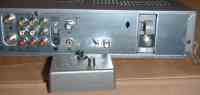
Your receiver may have a diplexer locked onto the back of the receiver.
If you will not be using a powered antenna remove it.
If you are not using the original powered antenna then
remove this diplexer it is not needed. Be sure to save it for later FTA use.
Follow these setup instructions.
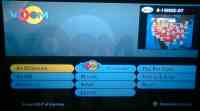
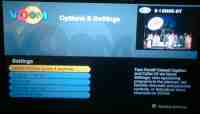
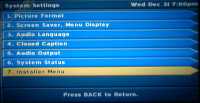
Press the following buttons in order
Voom
GREEN
Green
Select Option
Installers Menu.
<<
<<
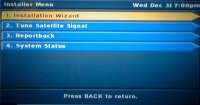
Select Option
Installation Wizard
If this menu does not have that option then you have old
software and can not scan for locals..
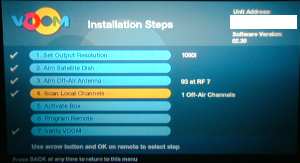
Select option 1 and place the receiver in the format mode
that matches your TV most likely 1080I
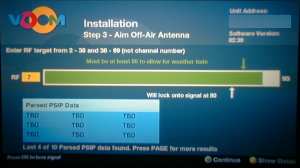
Select option 3 Aim Off Air Antenna. In this box you
will enter the RF channel you get at
antennaweb.org not the local analog ch # Aim
your antenna until the signal bar turns green. If you can not get a green
signal lock then you can not receive HDTV in your area due to low signal.
You need to get a larger or higher antenna.
Press YELLOW to view PISP data. Or GREEN to save.
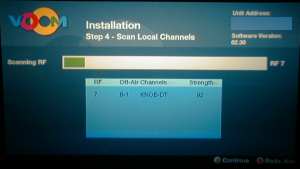
Select option 4 Scan Local Channels. This will scan all local channels
and display anything it finds.
Many people who have complained the the scan did not detect anything did
not pass steep 3.
It it pauses a while on your local channel but doesn't lock. Then the
channel is still testing and is not transmitting the proper ID code to
lock. So until they start sending out the ID code# you would need a
receiver with a channel map from your local area to receive them.
Press GREEN button to save and press WATCH, Tune to your local
channel.
Voom Access Card Information
The parental password is stored in the Voom access card but the card can be reset by plugging it into a good activated receiver.
Voom access card reset
If you have a Voom access card with an unknown parental password and or de-activated
it can be activated and password reset to the default password of 0000
to do this insert it into another receiver with the power off. Start up the receiver if the card was de-activated you will see
a black box with white lettering flash quickly on then off the screen the card is now activated and or the password is now set to the default 0000
Warning do not use the hidden factory reset menu because it will unactivate the receiver making it worthless.
At this time the off air Tv Guide will not work but it
should display the call letters of the local channel.
It is hoped that hobbyist will be able to get the guide
working.
Update: As far as I know no one is working on Voom any more. It was always hoped
that FTA mode could be activated.
Google bought motorola and sold the name to the chinese. Arris now owns Motorola
Mobility cable satellite division. It is unknown if google kept all the patents to
the DC2 digicypher encription system's the voom receiver.
Note: this is now a archine I am no longer working on this however if you have any new info I will post it.
Copyright 1998/2026 by winnfreenet.com all rights reserved.